C5 Alpha
An all-in-one ICT trading system that maps session liquidity, detects multi-timeframe fair value gaps, identifies liquidity sweeps with CISD, and generates structured entries with stop loss and take profit levels.
Methodology
ICT / SMC
Markets
All
Style
Overlay
Outputs
Entry, SL, TP
Overview
C5 Alpha is a precision-engineered Smart Money Concepts trading system designed for traders who follow ICT methodology. It automatically maps session liquidity levels across Asia, London, and New York, while tracking previous day high, low, and midrange as institutional reference points. Multi-timeframe fair value gaps from the Daily and 4-Hour charts are overlaid directly onto your lower timeframe, revealing the higher-timeframe imbalances that drive price. When price sweeps a liquidity level and confirms a Change in State of Delivery, the indicator identifies inverse fair value gaps for refined entry placement and plots complete trade setups with entry zones, stop loss, and take profit levels. An integrated SMT divergence filter adds an extra layer of institutional-grade confluence.
How It Works
C5 Alpha is a comprehensive ICT trading system that maps institutional liquidity levels, detects multi-timeframe imbalances, and generates trade entries through a Change in State of Delivery (CISD) confirmation process. The indicator tracks three trading sessions -- Asia (default 6:00-11:59 PM ET), London (12:00-6:00 AM ET), and New York (9:30 AM-4:00 PM ET) -- plotting their highs and lows as horizontal liquidity levels. Previous Day High, Low, and Midrange are also tracked. Daily and 4-Hour fair value gaps are detected and overlaid as colored boxes on your lower-timeframe chart.
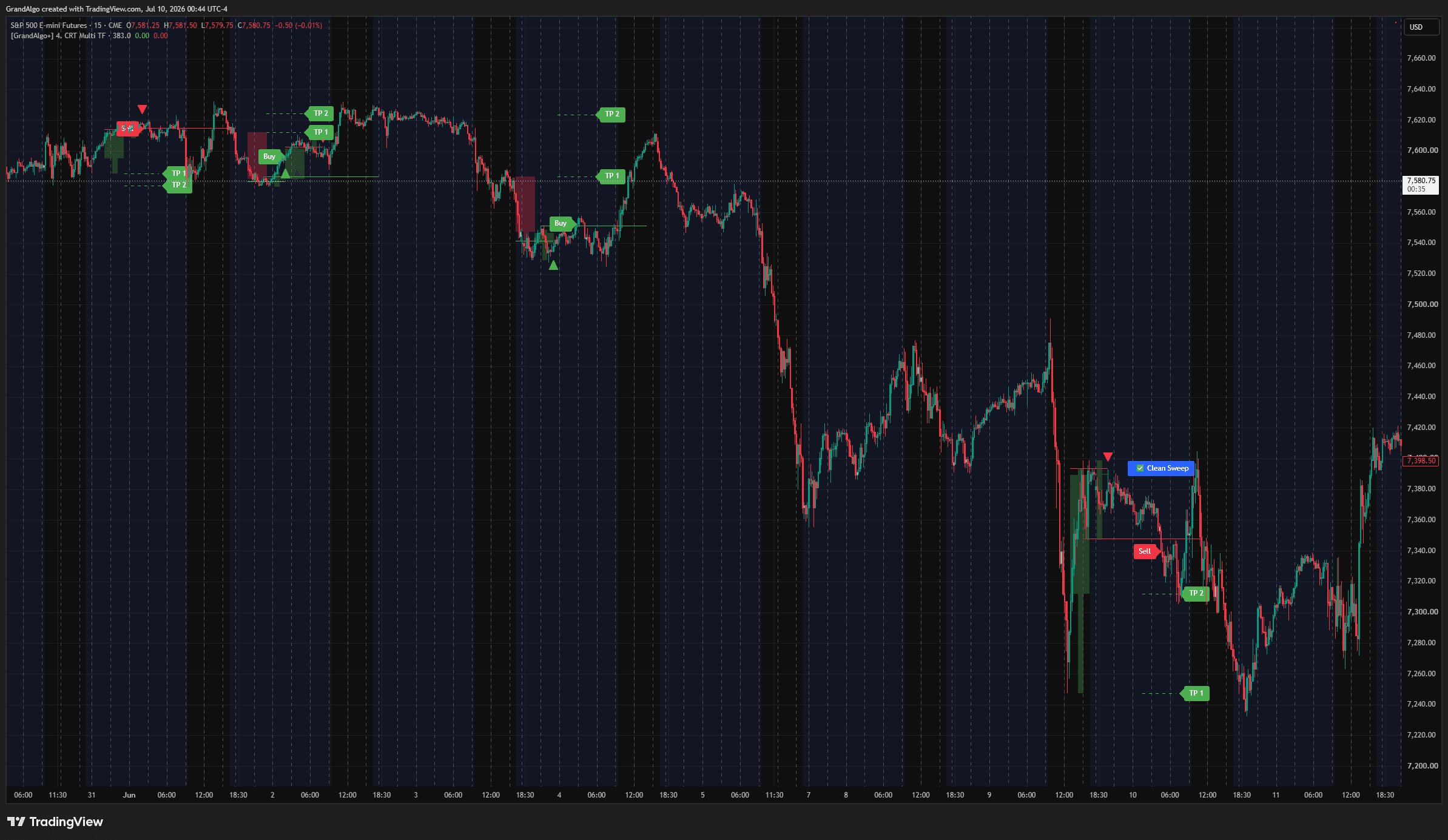
The core entry logic works as follows: when price sweeps below a tracked liquidity level (session low, PDL, or green FVG bottom) and then closes back above it, a green X-cross marker appears, indicating a potential buy-side liquidity sweep. The indicator then searches backward for a recent Change in State of Delivery -- a zone where price transitioned from bearish to bullish movement. This CISD zone is drawn as a filled region. When price breaks above the CISD zone within a configurable number of candles, the system looks for an inverse FVG (iFVG) that formed during the displacement and generates a Buy signal with entry, stop-loss, and take-profit levels. The sell-side logic mirrors this process in reverse.
An integrated SMT (Smart Money Technique) divergence module compares your instrument swing structure against a configurable correlated symbol. When one asset makes a new low while the correlated asset does not, the divergence is flagged with a special marker, adding institutional-grade confluence to the CISD entry. Entry placement can be configured to CISD Break, CISD Retest, iFVG Near, or iFVG Far, and the risk-reward ratio and stop-loss offset are fully adjustable.
Key Features
Session Liquidity Mapping
Automatically tracks and plots the highs and lows of Asia, London, and New York sessions, highlighting key liquidity pools that institutional traders target.
Multi-Timeframe FVG Detection
Identifies fair value gaps on both Daily and 4-Hour timeframes and overlays them on your lower timeframe chart, revealing higher-timeframe imbalances.
Liquidity Sweep & CISD Entries
Detects when price sweeps a session or previous-day level then reclaims it, confirming a Change in State of Delivery with precise entry placement.
SMT Divergence Filter
Compares swing structure against a correlated asset to detect Smart Money Tool divergences, flagging unconfirmed highs or lows.
Common Trading Setups
Practical ways to trade with C5 Alpha.
Session Sweep into CISD Entry
The primary C5 Alpha model: wait for price to sweep a session liquidity level, confirm a Change in State of Delivery, then enter on the iFVG within the CISD zone.
- 1Set your chart to the 1-minute to 5-minute timeframe (the indicator only works on 5-minute or lower).
- 2Wait for a green X-cross to appear below price, indicating a buy-side session level sweep, or a red X-cross above price for a sell-side sweep.
- 3Monitor for the CISD zone (filled region) to form as price displaces away from the sweep.
- 4The Buy or Sell signal fires when price breaks the CISD zone and an iFVG is detected within the structure.
- 5Use the entry at iFVG Near (default) for the tightest entry, with the stop-loss placed below the sweep extreme.
PDH/PDL Sweep with SMT Confirmation
Focus on Previous Day High and Low sweeps that are confirmed by SMT divergence against a correlated asset, filtering for the most institutional setups.
- 1Enable the SMT module and set the correlated symbol (e.g., ES for NQ, or ETH for BTC).
- 2Wait for price to sweep the Previous Day High or Previous Day Low level.
- 3Check if an SMT divergence marker (purple X-cross) appears, confirming that the correlated asset did not make the same extreme.
- 4Enter on the CISD confirmation with a higher conviction due to the SMT divergence alignment.
- 5Set the risk-reward ratio to 1.5 or higher since SMT-confirmed sweeps tend to produce larger reversals.
HTF FVG Zone Entry
Use the Daily or 4-Hour FVG boxes as directional bias zones, only taking CISD entries when they occur within or near a higher-timeframe imbalance.
- 1Identify the Daily and 4H FVG boxes on your lower-timeframe chart (labeled FVG D and FVG H4).
- 2Only take Buy signals when price is within or near a bullish HTF FVG (green box).
- 3Only take Sell signals when price is within or near a bearish HTF FVG (red box).
- 4This ensures your entries are aligned with higher-timeframe institutional order flow.
Settings Reference
Key settings you can configure in TradingView. See the full setup guide for detailed walkthroughs.
| Parameter | Type | Default | Description |
|---|---|---|---|
| CISD in X Candles | int | 10 | Number of candles within which a Change in State of Delivery must occur after a liquidity sweep for a valid setup. |
| SL Offset Enable | bool | true | Enables an additional stop-loss offset for extra breathing room beyond the calculated stop level. |
| SL Offset Multiple | float | 0.4 | The multiplier applied to the SL offset. Higher values place the stop further from the entry. |
| Risk Reward | float | 1.5 | The reward-to-risk ratio used for take-profit calculation. |
| Entry At | string | iFVG Near | Where to place the entry: at the near edge or far edge of the inverse Fair Value Gap. |
| PDH / PDL / PDR | bool | true | Enable/disable Previous Day High, Low, and Midrange levels as institutional reference points. |
| Session Mapping | bool | true | Enable/disable Asia, London, and New York session high/low tracking. |
| SMT Symbol | symbol | Binance:BTCUSDT.P | The correlated asset for Smart Money Tool divergence detection. |
Pro Tips
Trade During Kill Zones
ICT methodology emphasizes trading during specific kill zones (London Open, NY Open). C5 Alpha signals during these windows carry more institutional weight.
Use on 1-15 Minute Charts
C5 Alpha is designed for lower timeframe precision. The session mapping and CISD detection work best on 1m to 15m charts.
Verify SMT Divergence Manually
While the indicator detects SMT divergence automatically, cross-referencing with the correlated pair's chart builds conviction for the trade.
Keep the Default RR
The 1.5 RR default is calibrated for ICT-style setups. Resist the urge to set it too high, as ICT entries are typically precision-based with moderate targets.
Frequently Asked Questions
C5 Alpha is designed for the 5-minute chart and below. The session tracking, CISD detection, and iFVG scanning all require lower-timeframe granularity to function correctly. If you load it on a timeframe above 5 minutes, a warning message will appear in the top-right corner of the chart. The 1-minute to 3-minute chart is the sweet spot for most traders.
A CISD occurs when price transitions from delivering in one direction to delivering in the opposite direction. In the indicator, this is detected by scanning backward from the liquidity sweep for the point where candle color shifts from bearish to bullish (or vice versa). The zone between that transition point and the nearby swing extreme becomes the CISD zone, which serves as the institutional re-entry area.
CISD Break enters at the candle close when price breaks the CISD zone. CISD Retest waits for price to return to the CISD zone edge after breaking it. iFVG Near enters at the near edge of the inverse FVG detected within the CISD zone. iFVG Far enters at the far edge of the iFVG for the tightest possible entry. Each option offers a different risk/reward tradeoff.
The SMT module compares swing highs and lows on your current instrument against a correlated symbol. If your instrument makes a new swing low but the correlated asset makes a higher low (or vice versa for highs), a divergence is detected. This suggests that institutional traders are positioning differently across correlated assets, which is a strong confirmation signal for ICT-style reversals.
Get access to C5 Alpha
Included with every subscription plan alongside all 18 premium indicators. Subscribe today for just $19/mo.
Related Articles
Related Indicators
More tools in Buy & Sell Signals View all Buy & Sell Signals →