Skip to content
Buy & Sell Signals

GapHunter MTF

A multi-timeframe gap inversion strategy that aligns higher timeframe fair value gaps with lower timeframe inverse FVG reclaims to generate high-confluence Buy and Sell signals.

Timeframes

Multi-TF

Markets

All

Style

Overlay

Signals

Buy / Sell

Overview

GapHunter MTF is a multi-timeframe fair value gap strategy indicator built for traders who understand the power of gap inversions. It continuously scans a configurable higher timeframe for significant fair value gaps, then monitors the current timeframe for inverse FVG formations that signal institutional re-entry. When price reclaims an inverse gap while positioned within a higher timeframe imbalance zone, the indicator fires a clean Buy or Sell signal with real-time alerts. An adaptive filter ensures only meaningful gaps pass the threshold, while a price touchdown validation mechanism confirms that the higher timeframe gap is still relevant before any signal is issued.

How It Works

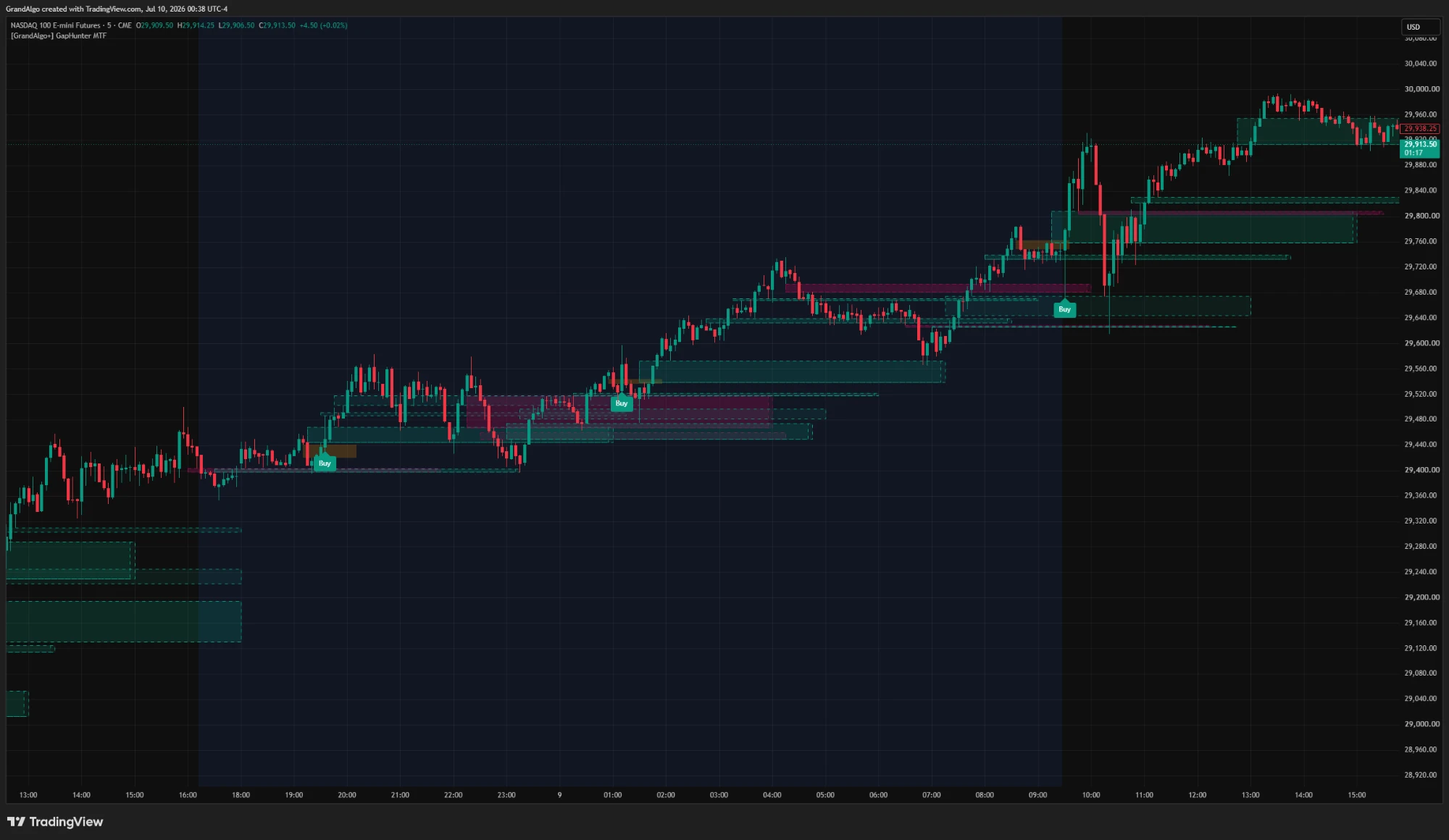
GapHunter MTF operates on a two-layer detection system that aligns higher-timeframe fair value gaps with lower-timeframe inverse gap reclaims. On the higher timeframe (configurable, default 15 minutes), the indicator scans for significant bullish and bearish FVGs using strict criteria: all three candles in the formation must be directionally aligned, the gap must exceed an ATR-based minimum size, and basing candles are excluded. These higher-timeframe gaps are projected as dashed boxes onto your trading chart, creating institutional imbalance zones that frame the trade.

On your current timeframe, the indicator watches for inverse FVG formations -- moments when a gap forms in the opposite direction to a tracked higher-timeframe gap. When price reclaims (closes beyond) this inverse gap while still positioned within or near the higher-timeframe imbalance zone, a Buy or Sell signal fires. An optional strict mode requires price to close beyond the far edge of the inverse gap rather than just the near edge, filtering out weaker reclaims.

A price touchdown validation mechanism adds a critical layer of relevance checking: before any signal is issued, the indicator confirms that price has actually interacted with the higher-timeframe FVG zone within a configurable candle window. This prevents signals from firing against stale or already-absorbed gaps. Higher-timeframe gaps are automatically invalidated when price closes decisively through them, keeping only active imbalance zones on the chart.

Key Features

01

Multi-Timeframe Gap Alignment

Detects fair value gaps on a user-selected higher timeframe and maps them onto your current chart, ensuring trades align with higher timeframe imbalances.

02

Inverse FVG Reclaim Signals

Triggers entries when price reclaims an inverse fair value gap, targeting institutional re-entry zones after initial displacement.

03

Adaptive Size Filtering

Uses an ATR-based minimum gap size requirement to filter out insignificant micro-gaps, ensuring only meaningful imbalances generate signals.

04

Price Touchdown Validation

Requires price to interact with the higher timeframe FVG zone within a configurable window before confirming a signal, preventing stale gap references.

Common Trading Setups

Practical ways to trade with GapHunter MTF.

01

HTF Gap Reclaim Entry

Enter when price reclaims an inverse FVG on the lower timeframe while positioned within a higher-timeframe bullish or bearish gap zone.

  1. 1Set the higher timeframe to match your analysis timeframe (e.g., 15m HTF while trading on the 1m or 3m chart).
  2. 2Wait for a dashed box to appear on your chart, indicating a higher-timeframe FVG has been detected.
  3. 3Monitor for price to pull back into the HTF gap zone and form an inverse FVG on your trading timeframe.
  4. 4Enter when the Buy or Sell label appears after the inverse gap is reclaimed with a confirmed close.
  5. 5Place your stop-loss beyond the opposite edge of the higher-timeframe gap zone.
02

Strict Mode Precision Entry

Use strict mode to only take signals where the inverse FVG reclaim closes beyond the far edge, ensuring maximum displacement before entry.

  1. 1Enable the Strict toggle in the indicator settings.
  2. 2Wait for a signal to appear -- these will be less frequent but require a stronger close beyond the inverse gap.
  3. 3Enter immediately on the signal candle close since the strict close confirms strong directional intent.
  4. 4Target the opposite boundary of the higher-timeframe gap as your first take-profit level.
03

Multi-Timeframe Gap Stacking

Add two instances of GapHunter MTF with different higher timeframes to find zones where gaps from multiple timeframes overlap, creating high-confluence trade areas.

  1. 1Add one instance with a 15-minute higher timeframe and another with a 1-hour higher timeframe.
  2. 2Identify areas where the dashed gap boxes from both timeframes overlap on your trading chart.
  3. 3Only take signals that fire within these overlapping zones for maximum institutional confluence.
  4. 4Use wider take-profit targets when multiple timeframe gaps align, as these zones tend to produce larger moves.

Settings Reference

Key settings you can configure in TradingView. See the full setup guide for detailed walkthroughs.

ParameterTypeDefaultDescription
Higher Timeframetimeframe15The timeframe to scan for significant fair value gaps. Should be higher than your chart timeframe.
Strict ModeboolfalseWhen enabled, applies stricter validation criteria for signal generation.
Inversion Within X Candlesint5Maximum number of candles within which the FVG must be inverted for a valid signal.
HTF FVG Touched in X Candlesint10The higher timeframe FVG must have been touched by price within this many candles to remain valid.
Min FVG Size (ATR Multiple)float0.1Minimum gap size as a multiple of ATR. Filters out tiny, insignificant gaps.
One Directional FVGbooltrueWhen enabled, only tracks one FVG per direction at a time, reducing signal noise.

Pro Tips

Start Without Strict Mode

Keep Strict disabled initially to understand the full range of signals. Enable it once you want to filter down to only the highest-quality setups.

Use the Touchdown Validation

The HTF FVG touchdown requirement ensures you're not trading stale gaps. Keep this parameter reasonable (5-15 candles) so signals reference recently active zones.

One Directional FVG Keeps It Clean

Tracking only one gap per direction prevents signal overload. Keep this enabled unless you specifically want to monitor multiple gaps in the same direction.

Frequently Asked Questions

The optimal higher timeframe depends on your trading timeframe. A general guideline is to use a timeframe 3-5x larger than your chart: if you trade on the 1-minute, use the 5-minute as HTF; if you trade on the 5-minute, use the 15-minute or 30-minute. The default of 15 minutes works well for most intraday setups on the 1-minute to 5-minute charts.

Before issuing a signal, the indicator checks that price has actually touched or entered the higher-timeframe FVG zone within the last X candles (configurable via the touchdown setting). This prevents signals from firing against old, potentially irrelevant gaps that price has not interacted with recently. A higher touchdown window is more permissive; a lower value requires very recent interaction.

In normal mode, a Buy signal fires when price closes above the near edge of a bearish inverse FVG. In strict mode, price must close above the far edge of the inverse FVG, requiring a stronger reclaim. Strict mode produces fewer signals but ensures the reclaim is decisive rather than marginal.

Higher-timeframe gap boxes are automatically removed when price closes decisively through them, indicating the imbalance has been fully absorbed. This is by design -- once a gap is invalidated, it no longer represents an area of institutional interest and should not influence your trading decisions.

Get access to GapHunter MTF

Included with every subscription plan alongside all 18 premium indicators. Subscribe today for just $19/mo.

Get StartedStarting at $19/mo