
ETH Apr 13 - 15M Session Fans
- Market
- Crypto
- Timeframe
- 15M
- Date
- April 13, 2026
Ethereum 15-minute chart. 5 session fib fans projected from daily session highs and lows. Fibonacci levels acting as dynamic support and resistance within each session.
Automatically draws a Fibonacci fan from the previous session's high and low, projecting dynamic diagonal support and resistance into the current session.
Timeframes
All intraday
Markets
All
Style
Overlay
Fan Levels
Multiple
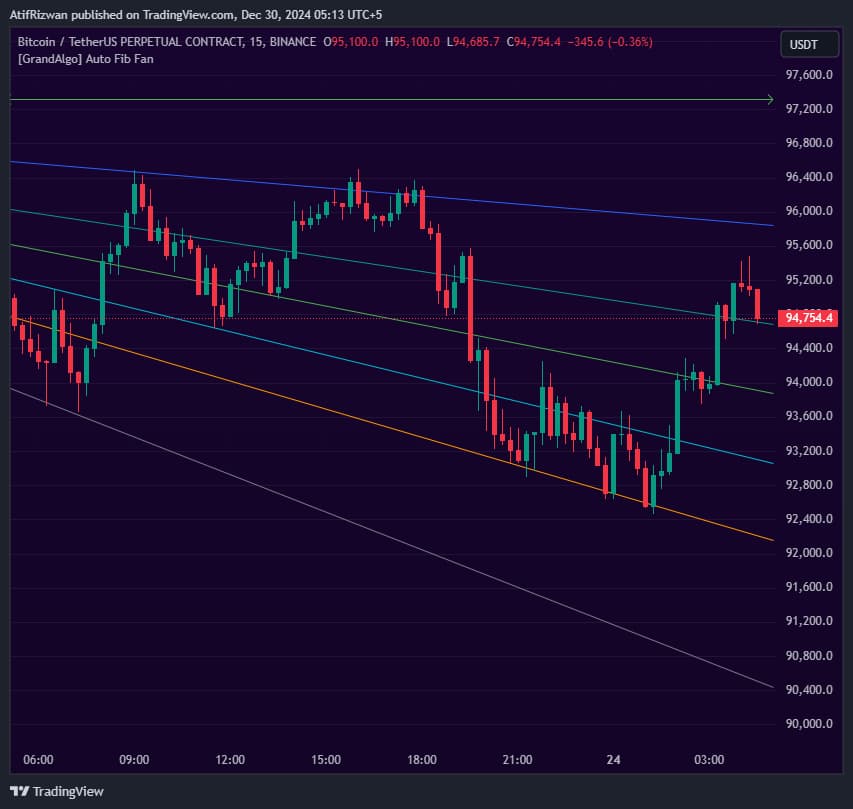
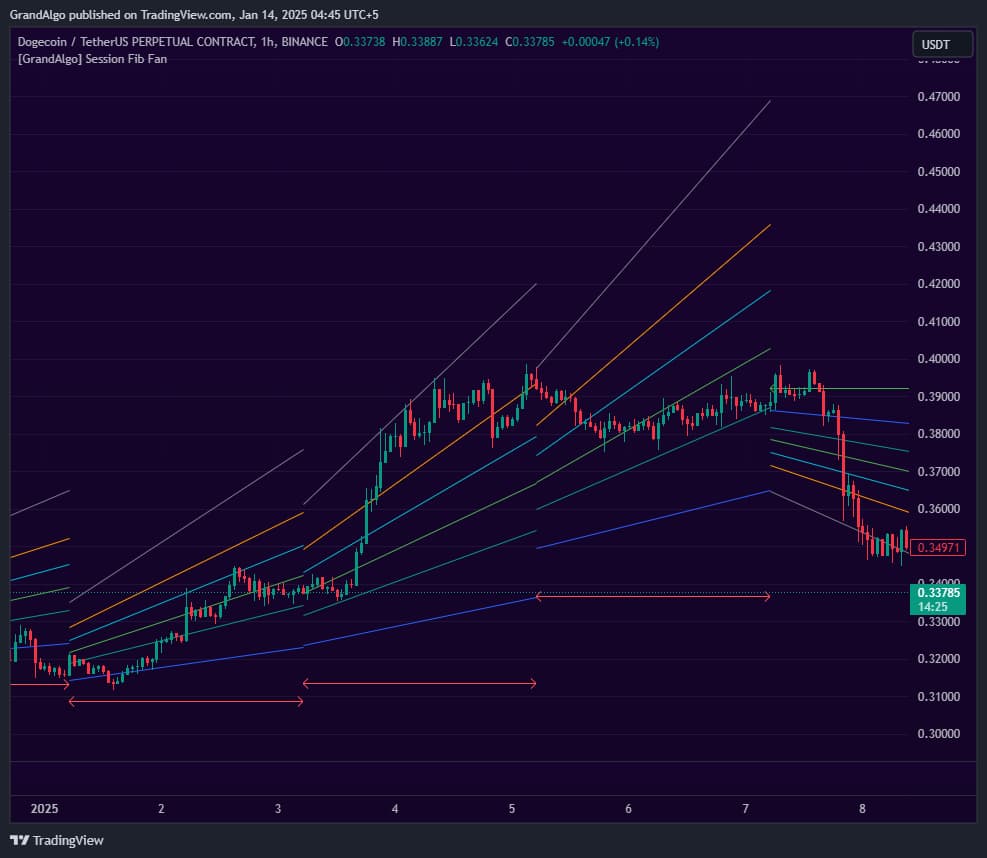
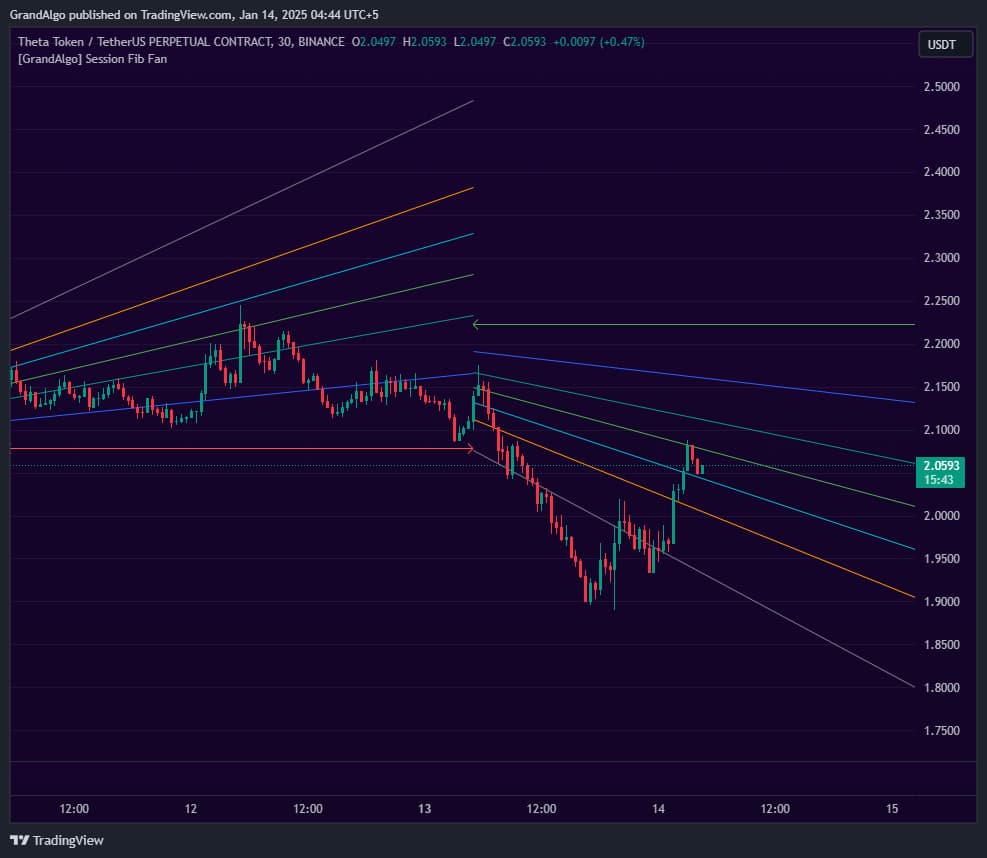
Session Fib Fan takes the guesswork out of Fibonacci analysis by automatically plotting fan levels from the prior session's price extremes. At each session boundary, it identifies the key price points and draws a directional fan with multiple Fibonacci ratio lines projected forward into the current session. These diagonal levels act as dynamic support and resistance that traditional horizontal levels miss -and price respects them with remarkable consistency.
Session Fib Fan automatically identifies the previous session's price extremes and draws a Fibonacci fan from those anchor points into the current session. At each session boundary (Daily by default, but configurable to Weekly or any higher timeframe), the indicator captures the highest and lowest prices from the prior session. Two coordinate modes are available: Highest-Lowest uses the absolute high and low of the session, while Open-Close uses the session's open and close prices as the anchor points.
From the anchor at the session's low (or open), the fan projects multiple diagonal lines to the opposite extreme, each line representing a key Fibonacci ratio: 0.25, 0.382, 0.5, 0.618, and 0.786. The fan's direction is determined automatically by comparing the positions of the anchor points -- if the high occurred after the low, the fan projects upward; if the low occurred after the high, it projects downward. This directional awareness ensures the fan always aligns with the session's prevailing price structure.
These diagonal Fibonacci levels act as dynamic support and resistance that traditional horizontal levels cannot capture. As price moves through the current session, these fan lines provide angled levels where price frequently stalls, reverses, or accelerates. The visual result is a set of converging rays that map the session's probable reaction zones from one session's structure into the next.
Dated Session Fib Fan charts from the public proof archive: what the indicator marked, and how price behaved around it. No win-rate claims.
Ethereum 15-minute chart. 5 session fib fans projected from daily session highs and lows. Fibonacci levels acting as dynamic support and resistance within each session.

Nasdaq futures 5-minute chart with session-based Fibonacci fan lines. The fan extends from the day's open, creating dynamic support/resistance levels as price progresses through the trading session.
Draws multiple Fibonacci fan lines from the previous session's extremes automatically -no manual anchoring or drawing required.
Choose between Highest-Lowest or Open-Close as the anchor points for the fan, adapting to your preferred analysis style.
The fan direction flips automatically depending on the session's price structure, always matching the prevailing session context.
Set the session timeframe to Daily, Weekly, or any higher timeframe to draw fans based on different session boundaries.
Practical ways to trade with Session Fib Fan.
Enter a trade when price pulls back to a key Fibonacci fan line during the current session and shows a rejection, treating the fan line as dynamic support or resistance.
Trade breakouts when price breaks through a fan line with momentum, confirming the move with a close beyond the line and targeting the next fan level.
Combine the Fibonacci fan with the session's opening range to find confluence zones where the fan line intersects with early-session price structure.
Key settings you can configure in TradingView. See the full setup guide for detailed walkthroughs.
| Parameter | Type | Default | Description |
|---|---|---|---|
| Session | timeframe | D | Sets the timeframe for the session on which the fan is calculated. Use Daily for intraday, Weekly for swing trading. |
| Fan Co-Ordinates | string | Highest-Lowest | Determines the anchor points for the fan: either Highest-Lowest or Open-Close of the selected session. |
| Show Session Separator | bool | false | Displays a vertical line at each session boundary for visual reference. |
| Show Historical | bool | false | Shows fans from previous sessions instead of only the current one. |
The indicator shines on 1-minute to 1-hour charts where intraday session dynamics are most relevant. Higher timeframe charts may not benefit from session-level fan analysis.
When multiple fan lines from different Fibonacci ratios converge near the same price, that area becomes a high-probability reaction zone.
The fan direction indicates the session's bias. Trading with the fan direction tends to produce higher-probability setups than counter-trend entries.
Fan level reactions are more significant when accompanied by increased volume, confirming institutional participation at those diagonal levels.
Highest-Lowest uses the absolute high and low price of the previous session as the fan's anchor points. Open-Close uses the session's opening and closing prices instead. Highest-Lowest captures the full session range and tends to produce wider fans, while Open-Close focuses on the session's net directional move and can produce tighter, more trend-aligned fans. Most traders start with Highest-Lowest and switch to Open-Close if they prefer a more directional interpretation.
The default Daily session works best for most intraday traders, drawing a new fan at the start of each trading day. Weekly fans are useful for swing traders who want fan levels that persist across multiple days. You can set any higher timeframe as the session boundary. The indicator only works on chart timeframes lower than the session timeframe -- for example, a Daily fan requires your chart to be on an intraday timeframe.
The fan direction is determined by the temporal relationship between the session's high and low. If the high occurred later in the session than the low (the session rallied), the fan projects upward from the low. If the low occurred later (the session sold off), the fan projects downward from the high. This automatic directional flip ensures the fan always matches the session's price narrative.
By default, the indicator shows only the most recent session's fan for a clean chart. You can enable the Show Historical option to display fans from all previous sessions, which is useful for seeing how price has respected fan levels across multiple sessions. However, this can create visual clutter, so most traders keep it disabled and focus on the current fan.
Included with every subscription plan alongside all 18 premium indicators. Subscribe today for just $19/mo.
