Impulse & Balance
Projects key price levels directly onto the chart using proprietary momentum analysis, marking Impulse, Balance, and Apex zones as actionable support and resistance.
Timeframes
All
Markets
All
Style
Overlay
Alerts
6 types
Overview
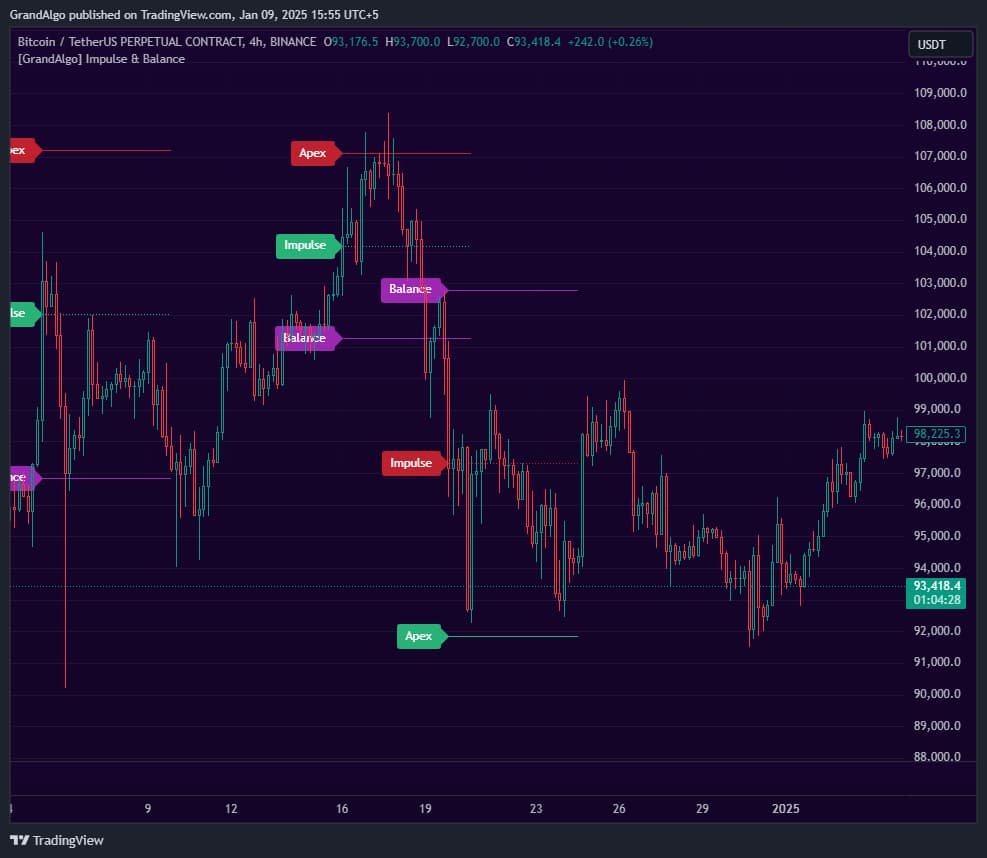
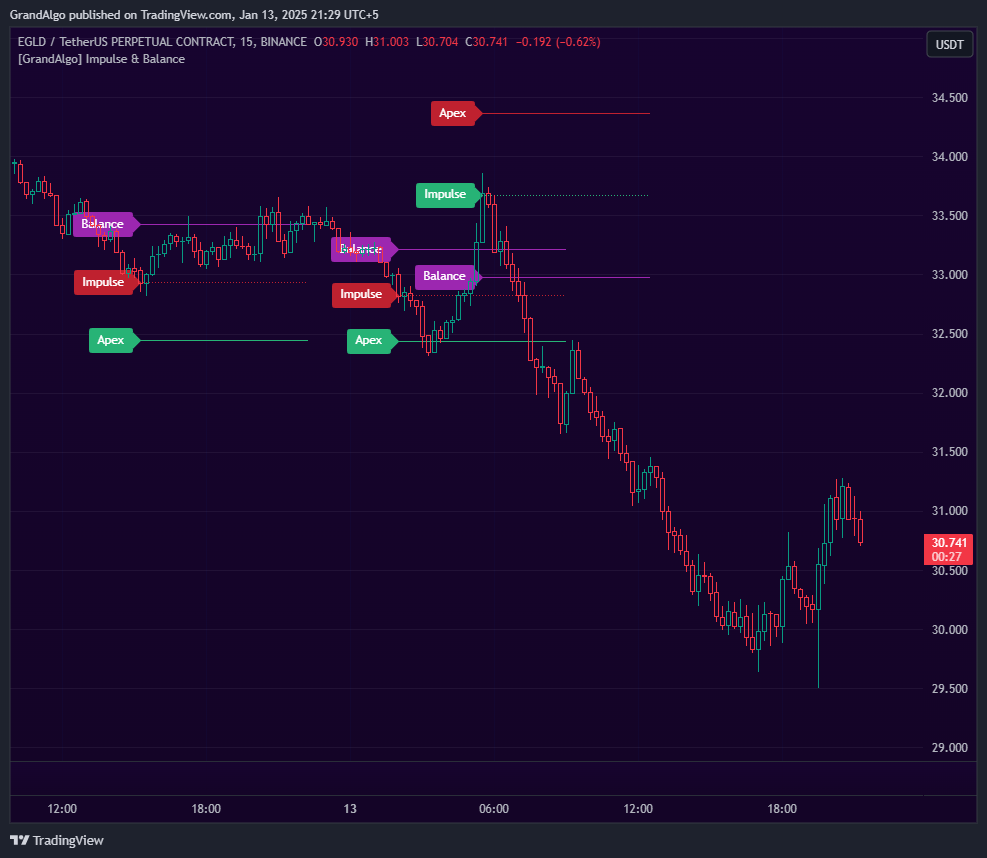
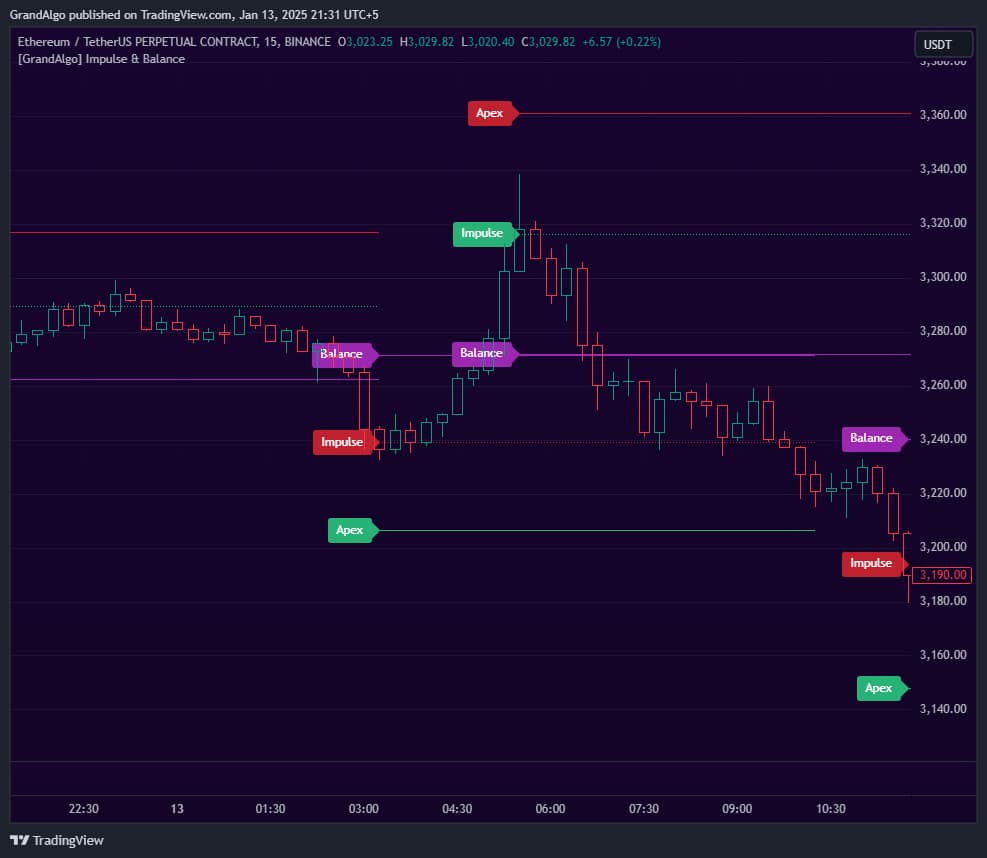
Impulse & Balance uses proprietary momentum analysis to calculate and project three key price levels directly onto your chart as horizontal support and resistance lines. When momentum reaches an extreme, the indicator plots the Impulse level (where the momentum signal triggers), the Balance level (the market equilibrium midpoint), and the Apex level (an extended target beyond the impulse). These projected levels act as potential reversal zones, continuation points, or profit targets -giving you actionable price lines you can trade from directly on your chart.
How It Works
Impulse & Balance uses a modified RSI calculation to detect momentum extremes and reverse-engineer precise price levels from those extremes. When RSI crosses above the overbought threshold, the algorithm computes the exact price at which RSI would equal 70 (Impulse), 50 (Balance), and the mirror extension beyond Impulse (Apex). The same logic applies in reverse when RSI crosses below oversold. The result is three concrete horizontal price levels projected directly onto the chart at each momentum signal.
The Impulse level marks where the momentum extreme triggered -- this is typically the nearest support or resistance target. The Balance level represents the equilibrium midpoint where bullish and bearish pressure would theoretically neutralize. The Apex level extends beyond the Impulse by the same distance as Impulse-to-Balance, providing an extended target for strong trends. Each level is drawn as a horizontal line that extends forward until price enters the range between Apex and Balance.
A configurable Length parameter (1-10) scales the underlying RSI period, controlling how sensitive the momentum detection is. Lower values produce more frequent signals on smaller swings, while higher values focus on major momentum shifts. Separate alerts fire when price touches any of the three level types, so you can monitor setups without watching the chart.
Key Features
On-Chart Price Level Projection
Projects key price levels directly onto the chart using proprietary momentum calculations -no separate pane or oscillator reading required.
Three Level Types
Impulse (momentum extreme), Balance (equilibrium midpoint), and Apex (extended target) -each serving as distinct support and resistance.
Directional Color Coding
Green levels for bullish momentum signals, red for bearish signals, with distinct coloring for the balance midpoint.
Touch Detection & Alerts
Detects when price reaches each level type with separate alerts for Impulse, Balance, and Apex touches.
Common Trading Setups
Practical ways to trade with Impulse & Balance.
Impulse Level Mean Reversion
When price reaches an Impulse level, it often marks the end of the current move. Use the level as a reversal entry point targeting the Balance level as the first profit target.
- 1Wait for a new Impulse level to appear after a momentum extreme (green for bullish, red for bearish).
- 2Watch for price to pull back toward the Impulse level from the direction of the move.
- 3Enter a mean-reversion trade when price touches the Impulse level and shows a rejection candle.
- 4Place your stop-loss beyond the Apex level on the same signal.
- 5Take profit at the Balance level (the purple midpoint line).
Balance Level Continuation
The Balance level acts as an equilibrium point. Price that holds at Balance and bounces in the trend direction often continues toward the Apex level.
- 1Identify the current trend direction from the most recent Impulse signal color (green = bullish, red = bearish).
- 2Wait for price to retrace to the Balance level (purple line).
- 3Confirm the trend is intact by checking that price has not closed beyond the Impulse level against the trend.
- 4Enter in the trend direction when price bounces from Balance with a confirming candle.
- 5Target the Apex level for an extended move, with the Impulse level as a secondary target.
Apex Extension Breakout
The Apex level is the extended target. Price reaching Apex in a strong trend often signals the final push before exhaustion.
- 1Enable the Apex level display in the indicator settings.
- 2Monitor a strong trend where price has already moved past the Impulse and Balance levels.
- 3If price is approaching Apex, prepare for either a final push to the level or exhaustion just before it.
- 4Take partial profits at Apex if you are already in a trend trade.
- 5Watch for reversal signals at Apex, as it often marks the extreme of the momentum cycle.
Settings Reference
Key settings you can configure in TradingView. See the full setup guide for detailed walkthroughs.
| Parameter | Type | Default | Description |
|---|---|---|---|
| Length | int | 1 | Multiplier for the internal RSI calculation length (x14). Value of 1 = 14-period RSI, 2 = 28-period, etc. Higher values produce smoother, less frequent signals. |
| Show Impulse Levels | bool | true | Displays the Impulse level where the momentum extreme triggered. |
| Show Balance Level | bool | true | Displays the Balance level representing the market equilibrium midpoint between impulse extremes. |
| Show Apex Level | bool | false | Displays the Apex level, an extended target beyond the impulse for ambitious profit targets. |
Pro Tips
Start with Length 1
The default Length of 1 (14-period) captures most momentum swings. Only increase it if signals are too frequent for your trading style.
Use Impulse for Entries, Balance for Exits
A common workflow: enter when price touches an Impulse level in your favored direction, target the Balance level for profit.
Set Alerts on All Three Levels
The six alert types (bullish/bearish for each level) ensure you never miss a momentum extreme, even when away from the chart.
Frequently Asked Questions
Impulse marks the price at which the momentum extreme was detected -- it acts as the nearest support or resistance target. Balance is the equilibrium midpoint where buying and selling pressure would theoretically neutralize, functioning as a mean-reversion target. Apex is the mirror extension of the Impulse-to-Balance distance beyond Impulse, serving as an extended target in strong trends.
The Length parameter (1-10) scales the underlying RSI calculation period. A Length of 1 uses a 14-period RSI and produces the most frequent signals, catching smaller momentum swings. A Length of 10 uses a 140-period RSI and produces far fewer signals, focusing only on major momentum extremes. For intraday trading, values of 1-3 work well. For swing trading, try 4-7.
Balance and Apex levels are separately toggleable in the indicator settings. If you only see the Impulse level, check that 'Show Balance Level' and 'Show Apex Level' are enabled. By default, the Apex level is disabled to keep the chart clean, while Impulse and Balance are enabled.
Each set of projected levels remains active as long as price stays within the range between the Apex and Balance levels. The lines extend forward automatically while price is interacting with them. Once price moves out of the active range or a new signal fires, the previous levels stop extending. The indicator retains up to 10 sets of historical levels on the chart.
Get access to Impulse & Balance
Included with every subscription plan alongside all 18 premium indicators. Subscribe today for just $19/mo.