Automatic Parallel Channel
Automatically detects swing pivots and constructs parallel price channels with extension lines, invalidating when price breaks out.
Strength Levels
5 options
Markets
All
Style
Overlay
Alerts
Built-in
Overview
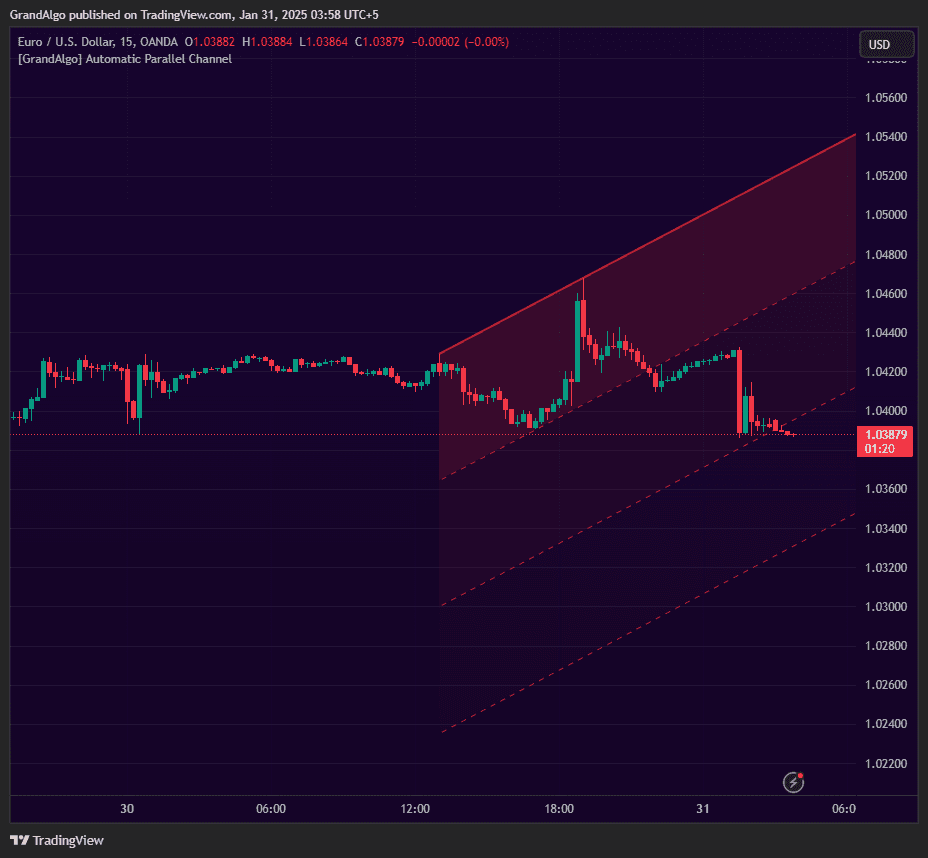
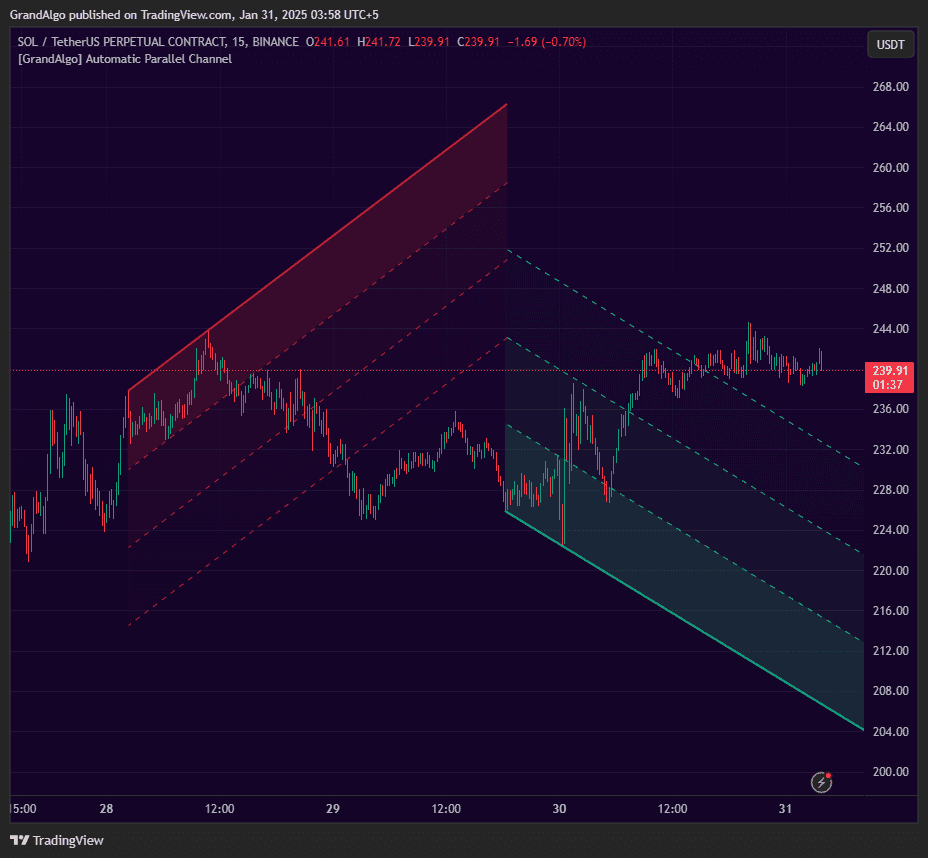
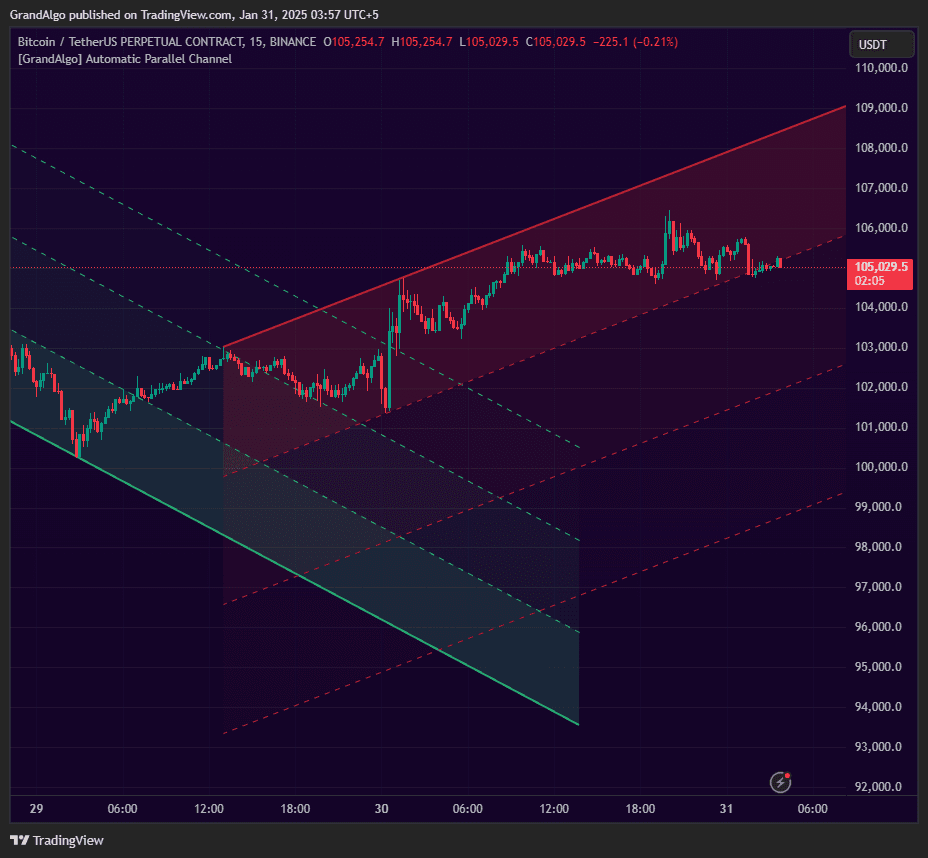
Automatic Parallel Channel eliminates the subjectivity of manual channel drawing. Using pivot detection with five sensitivity levels, it identifies consecutive swing highs or lows that form a valid trend line, then projects a parallel boundary through the most extreme price point on the opposite side. An additional extension line projects beyond the channel for target zones. Slope steepness is normalized to prevent unrealistic channels, and channels automatically invalidate when price decisively breaks beyond the boundaries. The result is mathematically precise trending corridors that adapt as new swing structure develops.
How It Works
Automatic Parallel Channel detects swing pivots using a configurable sensitivity setting (Micro, Minor, Intermediate, Major, Macro) that controls the pivot lookback length. When two consecutive swing highs or two consecutive swing lows are identified, the indicator draws a trend line connecting them. It then searches the price action between those pivots for the most extreme point on the opposite side -- adjusting for the channel's slope -- and projects a parallel boundary through that point.
The slope of each potential channel is validated against an ATR-normalized steepness threshold. If the channel would be unrealistically steep (indicating noise rather than a genuine trend corridor), it is rejected. The maximum slope steepness is user-configurable, letting you filter out sharp, short-lived channels while keeping broader ones. A minimum distance between the two anchor pivots prevents channels from forming on insignificant price moves.
Beyond the main parallel boundary, a configurable extension line is projected at a Fibonacci multiple of the channel width. This third line serves as a breakout target or extended support/resistance. Channels are automatically invalidated when the lowest close over a rolling window moves above the upper boundary (for descending channels) or the highest close drops below the lower boundary (for ascending channels), keeping only structurally relevant channels on the chart.
Key Features
Five Sensitivity Levels
From Micro to Macro, choose how aggressively channels are detected to match your trading style -from scalping to position trading.
Steepness Validation
Slope steepness is validated to prevent excessively steep or unrealistic channels from being drawn on the chart.
Extension Line
A configurable extension line projects beyond the channel, providing a target zone for breakout or continuation moves.
Auto-Invalidation
Channels automatically clear when price decisively breaks beyond the boundaries, keeping the chart current and clutter-free.
Common Trading Setups
Practical ways to trade with Automatic Parallel Channel.
Channel Boundary Bounce
Trade reversals at the upper or lower channel boundary, expecting price to stay within the established parallel corridor.
- 1Wait for a channel to form and confirm that price is respecting both boundaries with at least one touch on each side.
- 2When price approaches the lower boundary of a green (ascending) channel, look for bullish reversal candlestick patterns.
- 3Enter long at the lower boundary with a stop-loss below the extension line.
- 4Target the upper channel boundary or the midpoint of the channel.
- 5Reverse the logic at the upper boundary of a red (descending) channel for short entries.
Extension Line Breakout Target
When price breaks out of the channel, use the extension line as a target for the breakout move. The Fibonacci-based extension often acts as the next significant level.
- 1Monitor a channel where price is trending strongly toward one boundary.
- 2Watch for a decisive candle close beyond the channel boundary (breakout).
- 3Enter in the breakout direction once the candle closes outside the channel.
- 4Use the opposite channel boundary as your stop-loss reference.
- 5Target the extension line as your primary take-profit level.
Channel Break and Retest
After a channel breaks, the broken boundary often becomes the new support or resistance. Trade the retest for a high-probability continuation entry.
- 1Wait for the channel to be invalidated by a decisive close beyond the boundary.
- 2After the break, monitor for price to retrace back toward the broken boundary.
- 3Enter when price retests the broken boundary and shows rejection (wick rejection, engulfing candle).
- 4Place your stop-loss inside the old channel, beyond the retest candle.
- 5Target a distance equal to the channel width projected from the breakout point.
Settings Reference
Key settings you can configure in TradingView. See the full setup guide for detailed walkthroughs.
| Parameter | Type | Default | Description |
|---|---|---|---|
| Strength | string | Minor | Five sensitivity levels from Macro (widest swings) to Micro (tightest). Micro catches short-term channels, Macro captures major trend corridors. |
| Fib Extension Level | float | 3 | Adds a third line at the specified Fibonacci level beyond the channel for breakout targets. |
| Enable Green Channel | bool | true | Shows bullish (ascending) channels on the chart. |
| Enable Red Channel | bool | true | Shows bearish (descending) channels on the chart. |
| Max Slope Steepness | float | 3 | Maximum allowable slope difference. Prevents excessively steep or unrealistic channels from being drawn. |
Pro Tips
Let the Channel Form Naturally
The indicator needs at least 2-3 swing points to form a valid channel. Don't try to force a channel on choppy, directionless price action.
Respect Auto-Invalidation
When a channel clears from the chart, it means the trend structure has broken. Don't try to trade the old channel levels after invalidation.
Use Steepness Filtering
The Max Slope Steepness parameter prevents nearly-vertical channels from appearing. Keep it at the default unless you specifically want to allow steeper trend channels.
Frequently Asked Questions
The strength levels control the pivot detection sensitivity. Micro (2-bar lookback) detects the smallest swings and produces channels that form and break quickly -- suited for scalping. Minor (3-bar) and Intermediate (10-bar) offer moderate sensitivity for day trading. Major (20-bar) and Macro (30-bar) detect only significant swing points, producing wider, longer-lasting channels suited for swing and position trading.
Channels automatically invalidate when price decisively breaks beyond their boundaries. Specifically, if the lowest close over a rolling window exceeds the upper channel line or the highest close falls below the lower line, the channel is cleared. This keeps the chart showing only structurally relevant channels. A new channel will form when the next valid pair of swing pivots is detected.
This setting prevents unrealistically steep channels from appearing on the chart. The slope of each potential channel is normalized against ATR, and if the steepness exceeds your configured maximum (default 3, range 1.1-5), the channel is rejected. Lower values filter out steeper channels, while higher values allow more aggressive slopes. If you are seeing too few channels, try increasing this value.
The extension line is projected at a configurable Fibonacci multiple of the channel width beyond the outer parallel boundary. The default multiplier is 3x, meaning the extension line sits at a distance of 3 times the channel width from the primary trend line. This level often acts as a breakout target, extended support/resistance, or exhaustion zone for strong moves beyond the channel.
Get access to Automatic Parallel Channel
Included with every subscription plan alongside all 18 premium indicators. Subscribe today for just $19/mo.