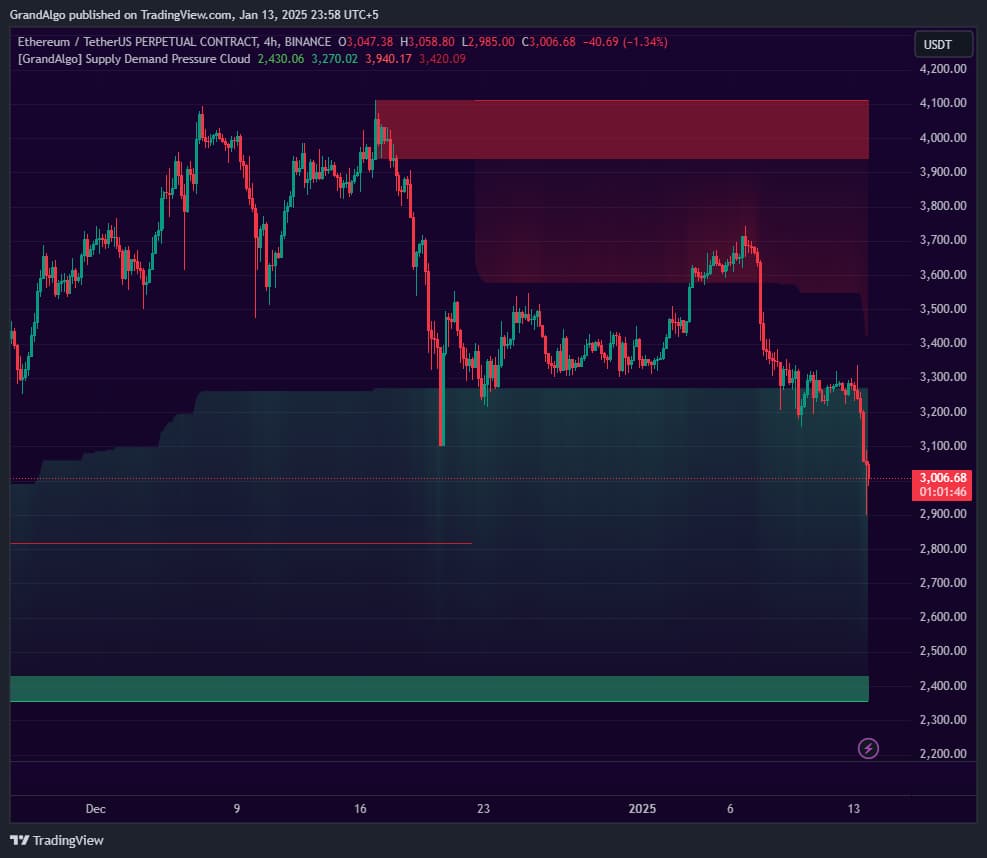
Supply Demand Pressure Cloud
Identifies supply and demand zones from structural breaks and extends gradient-shaded pressure clouds showing how far each zone's influence reaches.
Timeframes
All + MTF
Markets
All
Style
Overlay
Alerts
12 types


Overview
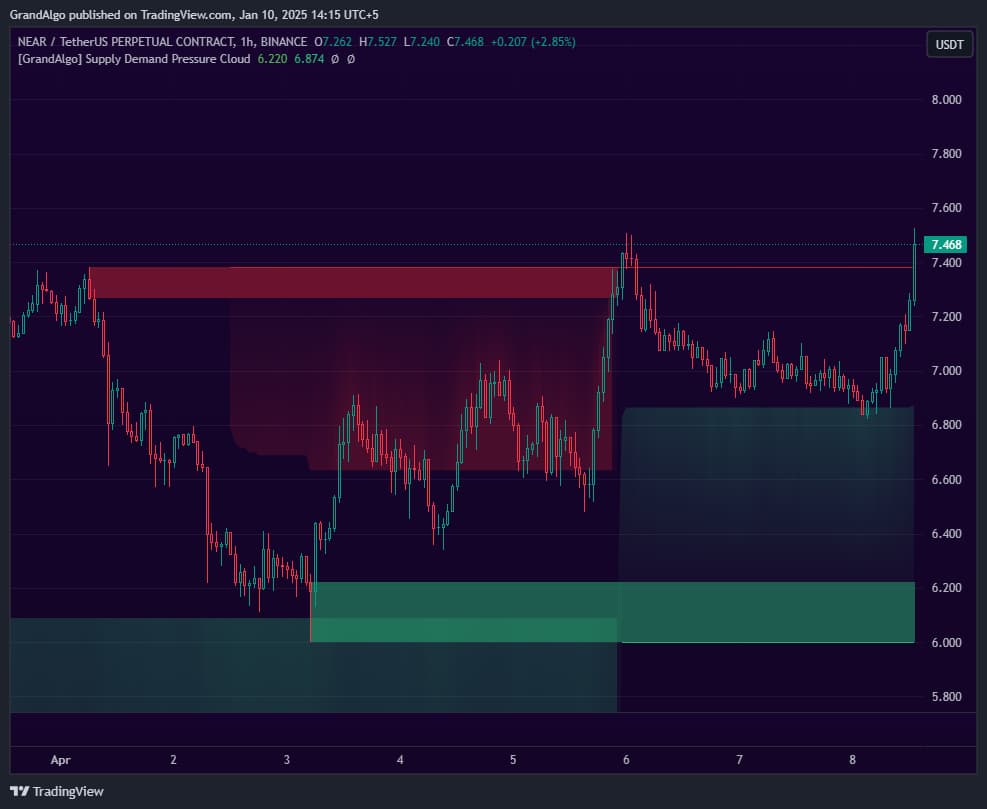
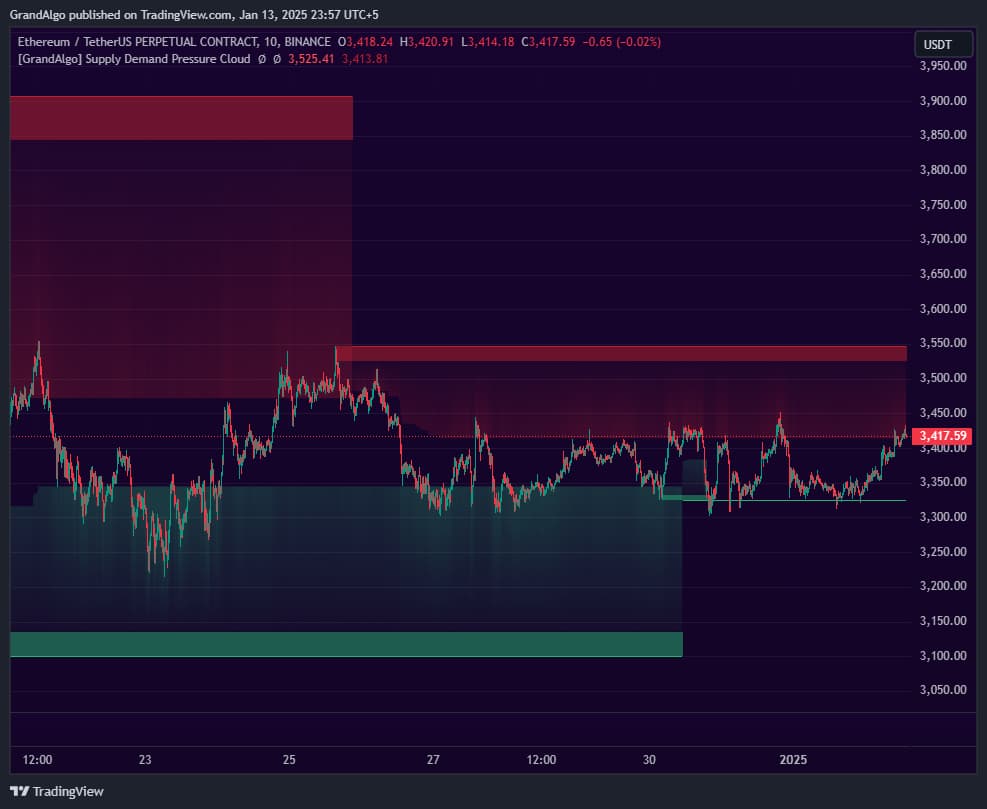
Supply Demand Pressure Cloud goes beyond traditional rectangular supply and demand zones by adding a dynamic pressure visualization. The indicator uses proprietary structure detection to identify key market patterns, then validates zones using strict criteria to ensure only genuine institutional levels are marked. Beyond drawing the zones themselves, it projects gradient-filled clouds that extend from each zone edge, showing how far the zone's buying or selling influence reaches into price action. Three pressure settings let you control the cloud's reach. Zones are automatically invalidated when price closes through them, and a comprehensive alert system notifies you when price interacts with zones, boundary lines, or cloud edges.
How It Works
Supply Demand Pressure Cloud identifies supply and demand zones by detecting structural pivot points where the market changed direction with conviction. The algorithm uses configurable swing detection with three strength levels (Major, Intermediate, Minor) to locate pivot highs and lows, then validates each zone through strict criteria: it checks that price has not returned above/below the pivot since formation and that a minimum percentage of subsequent candles confirm the directional move away from the zone.
What sets this indicator apart from traditional supply and demand tools is the pressure cloud visualization. Beyond drawing the zone itself, the indicator projects a gradient-filled cloud that extends from the zone's edge into the surrounding price action. The cloud's reach is controlled by three pressure settings (Strong, Moderate, Mild) based on Fibonacci ratios, visually showing how far the zone's buying or selling influence extends. Stronger pressure settings produce tighter, more intense clouds; milder settings extend the cloud further with a softer gradient.
Zones are automatically invalidated when price closes decisively through them, and an optional mitigation extension keeps the zone's lines visible until a new zone forms in the same direction. The multi-timeframe capability lets you run the entire analysis on a higher timeframe and project results onto your trading chart, revealing institutional-grade levels that are invisible on the lower timeframe alone.
Key Features
Structure-Based Zone Detection
Identifies supply and demand zones from key structural patterns with strict validation criteria to ensure only genuine institutional levels are marked.
Pressure Cloud Visualization
Extends gradient-filled clouds from zone edges, visually showing how far each zone's buying or selling pressure reaches into price action.
Configurable Strength & Pressure
Three strength settings control detection sensitivity. Three pressure settings adjust how far the cloud extends from each zone.
Comprehensive Alert System
Separate alerts for price touching demand zones, supply zones, boundary lines, and cloud edges -so you know exactly what price is interacting with.
Common Trading Setups
Practical ways to trade with Supply Demand Pressure Cloud.
Demand Zone Bounce with Cloud Confirmation
Enter long when price pulls back into a validated demand zone and reacts within the pressure cloud, confirming that buying pressure is still active at that level.
- 1Identify a demand zone that formed after a strong bullish displacement move.
- 2Wait for price to retrace back toward the demand zone -- the cloud should still be visible and not yet invalidated.
- 3Watch for price to enter the cloud region first, then penetrate into the core demand zone.
- 4Enter long when a bullish reaction candle forms within the zone (e.g., bullish engulfing or pin bar).
- 5Place your stop-loss below the demand zone's lower boundary and target the nearest supply zone above.
Supply Zone Rejection Short
Short when price rallies into a supply zone from a higher timeframe, using the pressure cloud as an early warning that selling pressure is about to take over.
- 1Set the indicator's timeframe input to a higher timeframe (e.g., 4H or Daily) to reveal major supply zones.
- 2On your trading timeframe, wait for price to rally into the higher-timeframe supply zone.
- 3Monitor for price stalling or wicking within the pressure cloud before reaching the core zone.
- 4Enter short when a bearish structure break or rejection pattern confirms on your trading timeframe.
- 5Target the demand zone below with a stop-loss above the supply zone's upper boundary.
Zone Invalidation Breakout
Trade breakouts when price decisively closes through a supply or demand zone, signaling that the level has been absorbed and the trend is likely to continue.
- 1Identify a supply or demand zone that price has tested multiple times without invalidating.
- 2Wait for a candle to close decisively beyond the zone's boundary (not just a wick through).
- 3The zone will automatically invalidate, confirming the breakout.
- 4Enter in the breakout direction and use the broken zone as your new support (for demand breaks turned resistance) or resistance (for supply breaks turned support).
Settings Reference
Key settings you can configure in TradingView. See the full setup guide for detailed walkthroughs.
| Parameter | Type | Default | Description |
|---|---|---|---|
| Select Timeframe | timeframe | Chart | Run the analysis on a higher timeframe and project results onto your current chart for multi-timeframe supply and demand. |
| Strength | string | Minor | Adjusts detection sensitivity: Major for precise institutional levels, Intermediate for moderate sensitivity, Minor for broader zone detection. |
| Pressure | string | Strong | Controls how far the gradient cloud extends from each zone: Strong, Moderate, or Mild. |
| Extend All Lines | bool | false | Extends all zone boundary lines forward indefinitely instead of stopping at mitigation. |
| Extend Mitigated Lines | bool | true | Keeps mitigated zone lines visible until a new zone forms, maintaining price memory on the chart. |
| Supply Cloud | bool | true | Toggles the gradient cloud visualization for supply (resistance) zones. |
| Demand Cloud | bool | true | Toggles the gradient cloud visualization for demand (support) zones. |
Pro Tips
Use Multi-Timeframe Analysis
Set the timeframe input to a higher timeframe while viewing a lower chart. This reveals where the big players have their zones while you time entries on your trading timeframe.
Focus on Fresh Zones
The first retest of a supply or demand zone is typically the strongest. Subsequent retests weaken the zone as the institutional orders get filled.
Cloud Edges as Early Warnings
When price enters a cloud, start preparing for a potential reaction at the zone itself. The cloud gives you advance notice before price reaches the core zone.
Combine with Market Structure
Supply and demand zones that form at Break of Structure or Change of Character points carry extra institutional significance.
Frequently Asked Questions
Strength adjusts the swing detection sensitivity. Major uses a longer swing length (30 bars) and detects only the largest structural pivots, producing fewer but more significant zones. Intermediate (20 bars) is a balanced middle ground. Minor (10 bars) detects smaller structural shifts and produces more zones, which is useful for scalping or lower timeframes.
Pressure controls how far the gradient cloud extends from each zone's edge, based on Fibonacci ratios. Strong (0.272) creates a tight, concentrated cloud close to the zone. Moderate (0.382) extends the cloud further. Mild (0.5) projects the widest cloud. The transparency also adjusts -- stronger pressure produces more opaque, visually intense clouds.
A zone is invalidated when price closes decisively through it. For a demand zone, this means a candle close below the zone's lower boundary. For a supply zone, a candle close above the zone's upper boundary. Wick-throughs alone do not invalidate zones. When the Extend Mitigated Lines option is enabled, the zone's lines remain visible until a new zone forms in the same direction.
Yes. The Select Timeframe input lets you run the entire supply and demand analysis on any higher timeframe and project the results onto your current chart. For example, you can view Daily supply and demand zones on a 15-minute chart, giving you institutional-level context while trading on a lower timeframe.
Get access to Supply Demand Pressure Cloud
Included with every subscription plan alongside all 18 premium indicators. Subscribe today for just $19/mo.
Related Articles
Related Indicators
More tools in Liquidity Toolkit View all Liquidity Toolkit →