How to Choose a TradingView Indicator (Without Wasting Money)
A systematic framework for evaluating trading indicators before you buy. Stop wasting money on tools that don't work and learn what actually matters.

Most traders waste hundreds of dollars on indicators before finding something that actually works. They see a screenshot with perfect entries, read a few glowing reviews, and hit buy. Three weeks later, they're back to square one, searching for the next magic solution.
The problem isn't that good indicators don't exist. Most traders don't know how to evaluate them.
This isn't about finding the "best" indicator. There is no best. There's only what works for your market, your timeframe, your risk tolerance, and your trading style. What matters is having a systematic way to separate legitimate tools from expensive distractions.
Here's the framework we use to evaluate any trading indicator before committing money to it.
1. Check for Repainting (This Is Non-Negotiable)
Before you evaluate anything else, you need to know if the indicator repaints. If it does, nothing else matters.
Repainting means the indicator changes its historical signals after the fact. A buy arrow appears on a closed candle, you enter the trade, and when you look back later, the arrow has moved or disappeared entirely. The backtest looks flawless because the indicator has the benefit of hindsight. Your live results look like a train wreck because you're trading based on signals that don't hold.
This is the single biggest scam in the indicator market, and it's surprisingly common. We've covered what repainting is and how to detect it in detail, but the quick test:
Open a chart with the indicator loaded. Take a screenshot. Wait for the current candle to close and a few more candles to form. Compare your screenshot to the current chart. If any historical signals have moved, changed, or disappeared, the indicator repaints.
Don't rely on the developer's word. Test it yourself. If the indicator repaints and the developer doesn't disclose it prominently, walk away immediately.
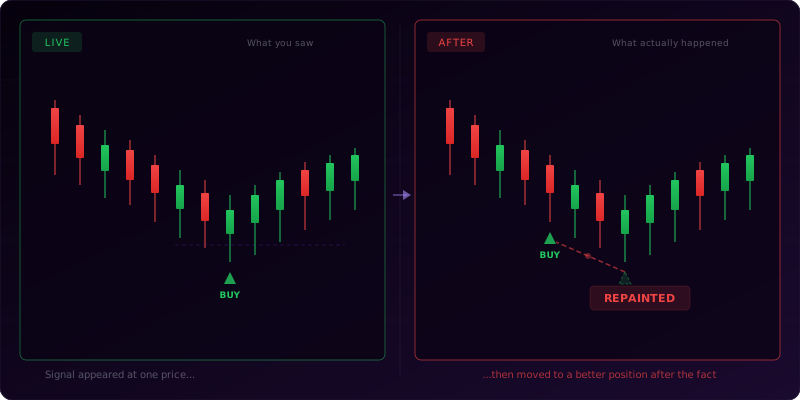
Some repainting is intentional and disclosed. A dynamic support/resistance level that adjusts as price moves isn't necessarily a problem if you understand what it's doing. But if buy/sell signals are changing after the fact, that's a deal-breaker.
2. Verify Multi-Timeframe Support
Single-timeframe indicators are like trading with one eye closed. You might catch some moves, but you're missing critical context.
The best setups happen when multiple timeframes align. A buy signal on the 5-minute chart means nothing if the 1-hour chart is in a strong downtrend. A demand zone on the 15-minute chart is exponentially more significant if it aligns with a daily order block.
When evaluating an indicator, ask: Does this work across multiple timeframes? Can I see higher timeframe context without switching charts?
This matters for two reasons. First, it saves time. If you're trading the 5-minute chart but need to check the 1-hour and daily for confluence, switching back and forth gets exhausting. An indicator that shows multi-timeframe signals or levels on a single chart keeps you focused.
Second, it forces better decision-making. When higher timeframe context is visible, you're less likely to take low-probability setups. A 5-minute buy signal might look great in isolation, but if your indicator shows a daily supply zone directly overhead, you know to wait.
Look for indicators that either (a) display multi-timeframe data on a single chart, or (b) work consistently across different timeframes without breaking. If an indicator only works on the 1-hour chart and falls apart on the 5-minute or daily, it's not reliable enough for real trading.
3. Look at Update Frequency
The market changes. New patterns emerge. Data sources shift. Platforms get updated. An indicator that hasn't been maintained in two years is a liability.
When you're evaluating an indicator, check the version history. How often is it updated? Are updates bug fixes, or are they adding new features and responding to user feedback?
This tells you two things. First, it tells you the developer is still engaged. If the last update was 18 months ago, what happens when TradingView pushes a breaking change? What happens when you find a bug? You're on your own.
Second, it tells you the indicator is being refined. The best tools get better over time. Developers who actively use their own indicators keep improving them. They add new features, optimize calculations, and fix edge cases. If the indicator hasn't been touched in years, it's probably not being used by the person who built it.
Look for indicators with regular updates, ideally monthly or quarterly. Check if the developer has a changelog or release notes. If they're transparent about what's being improved, that's a good sign.
Avoid lifetime access deals with no update policy. They sound appealing, but if the developer stops maintaining the product, your "lifetime access" is worthless.
4. Test on Live Charts, Not Screenshots
Every indicator looks amazing in the marketing screenshots. Perfect entries, clean exits, no losing trades. That's because those screenshots are cherry-picked.
You need to test the indicator on live charts in real-time, ideally on the assets and timeframes you actually trade.
Here's how to do this properly. Add the indicator to your chart. Watch it for at least a few trading sessions. Don't just scroll back through history. Watch it generate signals in real-time. See how it behaves when price is choppy. See what happens during high-impact news events. See if it's clear or if you're constantly second-guessing what it's telling you.
Ask yourself: Would I have taken this trade if I saw this signal in real-time? Or does it only look good because I already know what happened next?
This is where most traders fail. They backtest an indicator, see good results, and assume it will work live. But backtesting assumes you take every signal exactly as it appears, with no hesitation, no emotion, and perfect execution. Real trading doesn't work that way.
If the indicator requires you to interpret signals, how clear is that interpretation under pressure? If it gives 10 signals per session, can you realistically take all of them? If it requires you to check three other conditions before entering, will you actually do that when price is moving fast?
Test the indicator in the environment where you'll use it. If you can't trust it in real-time, you won't trust it with real money.
5. Check If It Works on Your Market and Timeframe
Not all indicators work on all markets. An indicator designed for forex might break on crypto. A tool optimized for the 1-hour chart might be useless on the 5-minute.
Before you buy, confirm the indicator has been tested on the specific market and timeframe you trade. If you trade BTC/USD on the 15-minute chart, find out if the indicator performs there. Don't assume it will just because it works on EUR/USD daily.
This is especially important for indicators that rely on specific market characteristics. If an indicator is designed around traditional market sessions (New York open, London open), it might not translate well to 24/7 crypto markets. If it's built for high-liquidity forex pairs, it might give false signals on low-volume altcoins.
Ask the developer directly if they've tested on your market. Look for user reviews or examples from traders using the same setup. If there's no evidence the indicator works in your specific context, you're the beta tester.
Also consider your timeframe. Some indicators are built for swing trading and perform poorly on scalping timeframes. Others are optimized for intraday trading and don't capture larger trends. If the marketing focuses on daily charts and you trade the 1-minute, there's a mismatch.
The more specific the indicator is about where it works, the better. If the developer says "works on all markets, all timeframes," be skeptical. That usually means it's been tested on a few cherry-picked examples and hasn't been rigorously validated across different conditions.
GrandAlgo
See these concepts automated on your charts
18 TradingView indicators — smart money, price action, supply/demand, and more.
6. Evaluate the Alert System
Alerts are critical. If you can't get notified when a setup forms, you're stuck staring at charts all day.
When evaluating an indicator, check: Does it support TradingView alerts? Are the alerts customizable? Can you set alerts for multiple conditions?
Good indicators let you create alerts for every signal type. If the indicator shows buy signals, demand zones, and liquidity sweeps, you should be able to set separate alerts for each. If you can only get a generic "something happened" alert, you're going to miss trades or waste time checking false alarms.
Also check how the alerts are triggered. Are they triggered at the close of the candle, or in real-time as conditions develop? Real-time alerts sound appealing, but they can be noisy. If an alert fires every time price touches a level, you'll be bombarded with notifications. Alerts that fire on candle close are cleaner and reduce false signals.
Customization matters too. Can you filter alerts by signal strength? Can you require multiple conditions to be met before an alert fires? The more control you have, the more useful the alerts become.
If the indicator doesn't support alerts at all, it's useless for active traders. You're paying for a tool you can only use if you're already watching the chart.
7. Look for Backtesting Capability
You need to know if the indicator actually works. Not based on marketing screenshots, but based on data.
The best way to validate an indicator is to backtest it systematically. This means running the indicator on historical data, recording every signal, and calculating win rate, average return, drawdown, and other performance metrics.
Some indicators make this easy. They include built-in performance tracking, or they output signals in a format you can easily export and analyze. Others make it nearly impossible.
When evaluating an indicator, ask: Can I backtest this? Does the developer provide performance data? If they do, is it verifiable, or just a screenshot with cherry-picked stats?
We've written a full guide on how to backtest a signal indicator properly, but the key is to look for transparency. If the developer shows performance data, they should explain the methodology. What asset? What timeframe? What entry and exit rules? What risk parameters?
If the developer refuses to share any performance data, that's a concern — it may mean they haven't tested it themselves, or the results were bad. "Results vary" is a legitimate and honest disclaimer (results genuinely do vary by trader and market), but it shouldn't be a substitute for sharing actual test data.
Ideally, the indicator should work with TradingView's Strategy Tester or provide some way to validate signals systematically. If you can't backtest it, you're flying blind.
What Checklist Should You Use?
Before you buy any TradingView indicator, run through this checklist:
- Repainting: Have I tested for repainting? Are historical signals stable?
- Multi-timeframe: Does this work across multiple timeframes? Can I see higher timeframe context?
- Updates: When was the last update? Is the developer actively maintaining this?
- Live testing: Have I watched this indicator in real-time on my charts?
- Market fit: Has this been tested on my specific market and timeframe?
- Alerts: Does it support customizable alerts? Can I get notified without watching charts?
- Backtesting: Can I validate this with data? Has the developer shared performance metrics?
If the answer to any of these is no, proceed with extreme caution.
What Does Indicator Evaluation Look Like in Practice?
Let's say you're evaluating an order block indicator. You're trading ES futures on the 5-minute chart.
First, you add it to your chart and watch for repainting. You screenshot a few signals, wait for candles to close, and verify they don't change. Clean.
Next, you check if it shows higher timeframe order blocks. It does. You can see 15-minute and 1-hour blocks on your 5-minute chart. That's useful for confluence.
You check the version history. Last update was two weeks ago. The developer added a new alert type and fixed a bug. Active maintenance.
You watch it run for three sessions. You note every signal. Some are clear. Others require interpretation. You decide you'd only take signals that align with higher timeframe blocks. That filters out about 60% of the signals, but the remaining 40% look high-probability.
You search for examples of other traders using this on ES. You find a few. Mixed reviews, but the complaints are about overtrading, not the indicator failing. That's a user issue, not a tool issue.
You set up alerts for 5-minute order block formation with higher timeframe confluence. You get 2-3 alerts per session instead of 10. Much more manageable.
You export the signals and run a backtest. Win rate is 58% with a 1.8 R-multiple on average. Not spectacular, but profitable and realistic.
You buy the indicator.
That's what systematic evaluation looks like. It's not fast, but it works. And it's a hell of a lot cheaper than buying five mediocre indicators before finding one that fits.
Frequently Asked Questions
Start by defining the exact problem you need solved. Then check whether the indicator repaints, works on your market and timeframe, has useful alerts, is updated regularly, and performs on live charts rather than only historical screenshots.
Never buy or rely on an indicator before checking repainting. If historical signals change after candles close, the tool may look perfect in hindsight but fail in live trading. Repainting behavior must be clear before anything else matters.
Screenshots are weak evidence because they can be cherry-picked. Use replay mode, live observation, and a written test sample. A real indicator should hold up across multiple market conditions, not just a few perfect examples.
The most useful features are non-repainting signals, multi-timeframe support, clear alerts, adjustable filters, documentation, and logic that fits your strategy. Cosmetic dashboards and vague win-rate claims matter much less.
Test it with your exact rules, markets, sessions, and risk model. If it improves trade selection or execution consistency, it fits. If it creates more signals, confusion, or conflicting decisions, it is not the right tool.
Why Shouldn't You Skip This Process?
It's tempting to shortcut this. You see a shiny new indicator, the developer's Instagram is full of winning trades, and you want results now.
Resist that urge.
The traders who consistently profit aren't the ones with the most indicators. They're the ones who took the time to find tools that fit their strategy, tested them properly, and integrated them into a complete system.
If you follow this framework, you'll waste less money, avoid the worst scams, and end up with tools that actually improve your trading instead of cluttering your charts.
Good indicators exist. You just need to know how to find them. If you are new to the process, start with our step-by-step guide on how to add a custom indicator to TradingView.
If you're looking for a transparent starting point, check out our performance page to see how our indicators hold up under real conditions, or explore our free trading tools to start building better habits before you spend a dollar.


